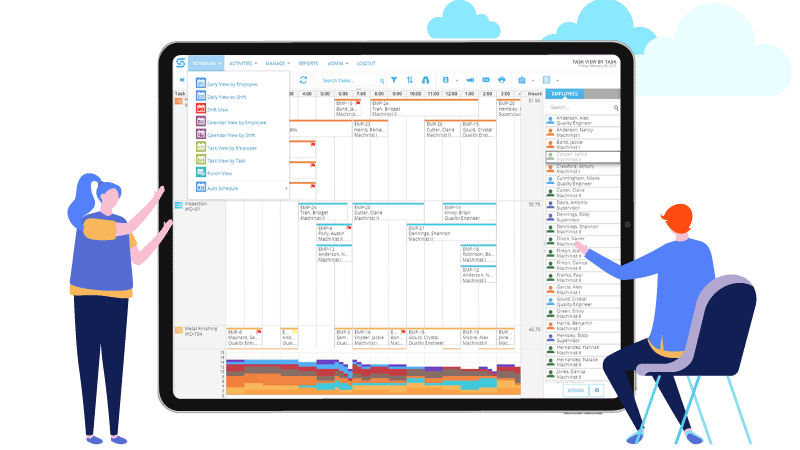
Skilled nursing & long-term care
Scheduling built for the way your facility actually staffs
Fill the 5 a.m. call-off without working down a phone list. Build next month’s rotation once instead of rebuilding it every week. See coverage by unit against the census you actually have, while there is still time to move somebody.
Snap Schedule 365 is staff scheduling software for nursing homes, skilled nursing facilities and long-term care communities.
Published pricing · No implementation project · No IT department required
Who uses Snap Schedule
Nursing homes, skilled nursing and rehabilitation providers scheduling around the clock


A week in the staffing office
If you run the schedule for a facility this size, you already know how this goes
A lot of nursing homes and long-term care facilities still run scheduling on a spreadsheet, a printed roster and a whiteboard. That works right up until the person who maintains it wants a day off.
The call-off
A 6-2 aide calls out. You check the census, work out who is licensed for that floor, and start down a phone list you keep in your head and a notebook.
The schedule is already wrong
You spent most of a day building the month. By Tuesday, two people have swapped, one is on FMLA and the printed copy on the wall no longer matches anything.
The overtime surprise
Someone landed at forty-eight hours. You find out when the hours are already worked and the money is already spent.
The expired card
A CNA has been working three weeks on a lapsed certification. Nobody was hiding it. It was in a binder and nobody looked.
Call-offs and open shifts
Hand the phone tree to the software
This is the part that hurts every morning, so it is the part we would fix first. You tell Snap Schedule what the opening needs, and it works out who is eligible, contacts them, and collects answers while you get on with the rest of your day.
Each candidate gets a response window. If it expires, the system moves to the next person on its own. Every offer, decline and no-answer stays attached to the shift, so when someone asks why they were not called, you have the record instead of your memory.
- Restrict the opening to the positions that can work it, and to the skills or certifications the unit requires
- Skip anyone already assigned that day, unavailable, or over their hour limits
- Reach people by text, in-app or voice instead of a call list
- Or post it for bidding, so eligible staff volunteer before you call anyone
One call-off, the old way
- 15 calls down a paper list
- 4 voicemails, no answer
- 1 agency call at 7:15
- 1 conversation with the DON at 9:00
Most of a morning gone, and no record of who was asked.
One call-off, in Snap Schedule
- 1 open shift
- 1 rule you built once
- 5 eligible people contacted in order
- 0 phone calls from you
You watch responses arrive instead of dialing, and the agency call becomes the last resort rather than the fallback.
A record, not a recollection
Every callout leaves a record
Months later, when someone is certain they were skipped, you have the answer rather than your memory: who was eligible, who was contacted and in what order, who declined, and who never responded. An expired offer is recorded separately from a decline, so an unanswered message never becomes a refusal on someone’s record.
Getting the week back
Build the rotation once, not every month
Most long-term care schedules are not improvised. They are patterns: every-other-weekend, a fixed day crew on one unit, a rotating night line. Once those are set up, the schedule generates instead of being rebuilt.
- Fixed, rotating, repeating, split and variable patterns, assigned per unit and per position
- Required, assigned and variance shown for every position on every shift, so a short night is visible before it happens rather than at handover
- Warnings while you assign, not after: double-bookings, missing skills, hour limits, rest periods
- Each unit keeps its own shifts, positions and staffing requirements
Stop being the help desk
Half your interruptions are people asking what they are working
Give staff their own schedule on their phone and a lot of the traffic through the staffing office simply stops. You still decide what needs your approval. Employee access is also what makes callouts and shift bidding work, since both reach your staff through the employee app.
- Their schedule, on their phone. Current assignments, unit and shift times, updated the moment you change something.
- Time off without a paper slip. Requests arrive with balances attached, and you approve or decline where you can see the coverage impact.
- Trades that follow your rules. Staff arrange swaps between themselves; you set whether a trade needs approval and whether it can create overtime.
- Open shifts they can claim. An offer arrives with the unit, date, hours and why it is open, and they accept or decline from the phone.
For the administrator
The two line items that move most in a facility this size
Overtime and agency are the costs that get away from a small facility fastest, and both are decided at the moment a shift is assigned rather than at the moment payroll runs. Once scheduling and attendance live in the same place, those decisions become visible while they can still be changed.
Overtime you can see coming
Hours accumulate against daily and work-period limits as you assign, and the schedule flags a shift that would push someone past a threshold you set. Estimated labor cost is visible on the schedule before the week is worked.
Agency as a last resort
Every open shift goes to your own qualified staff first, through bidding or a callout, before anyone phones a registry. Agency and contract staff can still be scheduled in the same system so you can see how much of the nursing home depends on them.
Stop letting one person be the system
When the schedule lives in a shared system rather than one person’s spreadsheet, the DON can cover the staffing office, and your coordinator can take a week off without the facility noticing.
Staffing to your census
Are you staffed right for the residents you have today?
Census moves. A facility at 78 residents does not need the same coverage as that same facility at 94, and a facility-wide average will not tell you that one unit ran two aides light on evenings all week.
Snap Schedule works out hours per patient day from the schedule itself against the census you record, unit by unit and position group by position group, with your required HPPD sitting next to the actual so the gap is a number rather than a feeling.
- Hours, census and HPPD for each unit, and for the facility as a whole
- Rolled up by position group so licensed nurses, aides and supervisors each carry their own figure
- Required HPPD alongside actual, so a unit sitting under its target is visible at a glance
- Because it runs on the schedule, you are looking at next week rather than only last month
And the reporting
Reporting without rebuilding the data
Nobody buys scheduling software because they enjoy compliance. But the staffing data behind PBJ, your Five-Star rating and your state’s minimums all starts life in the schedule, so a clean schedule is most of the work already done.
- Scheduled and worked hours by employee, day and job classification, with employees and contract staff kept distinct
- HPPD by unit and position, and weekend nurse staffing on its own rather than buried in a weekly average
- Certification expirations that surface when someone is scheduled, not when a surveyor asks
Snap Schedule holds the staffing data your submission is built from. The filing itself stays in your hands.
On the federal staffing mandate: you may still see software sold on the 2024 CMS rule requiring 3.48 nurse hours per resident day. That rule was repealed effective 2 February 2026. PBJ reporting, the Five-Star staffing rating, state minimums and the facility assessment all remain. How the staffing rating is calculated →
Watch
See how staffing decisions affect your Five-Star rating
Your published staffing rating is not a survey finding or an opinion. It is arithmetic performed on the hours you scheduled, the census you recorded, and the people who stayed — weekend coverage and turnover included.
A short walkthrough of how day-to-day scheduling decisions end up as the star families, referral sources and hospital partners see on Care Compare.
Where Snap Schedule sits
Enough depth for a real facility, without the enterprise weight
Generic scheduling apps do not understand nursing home units, positions, certifications or census. The enterprise workforce suites do, but they are priced and implemented for a chain with a corporate HR team. This sits deliberately in between.
Scroll the table sideways to see every column.
| Generic scheduling app | Snap Schedule 365 | Enterprise workforce suite | |
|---|---|---|---|
| Units, positions and certifications | Basic roles and locations | Built in | Built in |
| HPPD against daily census | Not addressed | Built in | Usually available |
| Sequential callouts with an audit trail | Broadcast messaging | Built in | Built in |
| Contract-specific callout ordering | Not addressed | Custom rules, quoted separately | Configuration or services work |
| Getting started | Self-serve | Self-serve, with help from us | Implementation project |
| Pricing | Published | Published | Quote |
| Corporate IT involvement | None | None | Often required |
Categories, not specific products. Capabilities vary between vendors within each column, so treat this as a description of the three kinds of tool rather than a scorecard of any one of them.
No implementation project
You set it up with help from us rather than through a consulting engagement. There is nothing for an IT department to host or patch, which matters when your IT department is a contractor who visits on Thursdays.
A software company, not a staffing marketplace
Snap Schedule has no financial interest in filling your shifts with outside labor. We take no share of a filled shift, so the software is built to cover openings from your own qualified staff first.
Real support from people who know the product
Snap Schedule is built and supported by Business Management Systems in Anaheim, California. When you call, you reach people who work on the software itself.
Frequently asked questions
Questions staffing teams actually ask
How long does it take to get running?
The work is setting up your units, shifts, positions and staff, then building your recurring patterns once. There is no implementation project, no consultant on site, and nothing to install. The free 30-day trial is the full product, so the setup you do during the trial is the setup you keep — and our team will help you get the first schedule built rather than leaving you with a manual.
Do we need an IT person?
No. Snap Schedule 365 runs in a browser and there is no server to host or software to install and patch. Schedulers work at app.snapschedule365.com and staff use the mobile app or a browser. If your nursing home does not have IT support, which many do not, nothing here requires it.
How many scheduler subscriptions do we need?
One for each person who creates or modifies schedules, approves time off, or authorizes trades. Each scheduler covers an unlimited number of employees, so the count follows your management structure rather than your headcount. Most single facilities run two or three: the staffing coordinator, the DON, and often a weekend or evening supervisor, so the staffing office is never dependent on one person being reachable.
What does it cost for a facility our size?
Pricing has two parts and both are published, so you can work it out yourself rather than waiting for a quote. You pay per scheduler — the people who build and manage schedules, each covering unlimited employees — and then for employee access, sold in packs of five with lower per-employee rates as the count rises. Because employee access is what drives callouts, shift bidding and self-service, most facilities size it to cover the staff they want the system to be able to reach. The pricing page has the full list and a calculator, and there is no implementation fee or minimum term.
Do all our employees need smartphones?
Not smartphones specifically — employee access works from a phone, a tablet, or any browser on a computer, so a staff member without a smartphone can still use it from a break room terminal or at home. But they do need to be covered by employee access if you want them included in callouts, shift bidding or open shift offers, since those features work by reaching people through the employee app. Staff you leave out will still be scheduled normally; the system just cannot contact them about an opening.
Can Snap Schedule fill a call-off automatically?
It automates the mechanics. You define the opening, and the employee selection rule screens for eligibility using availability, conflicting assignments, daily and work-period hour limits, home location and location authorization, narrowed further by the positions allowed and the skills or certifications required. It then contacts candidates one at a time, each with a response window, advancing automatically when a window expires, and keeps the full response history against the shift. Candidates need to be covered by employee access for the system to reach them.
Can callout order follow our own overtime or seniority policy?
Yes, and most of our customers run at least one rule like this. It is worth being precise about how. The standard rules you configure yourself determine who is eligible for a shift. Ordering the list — by accumulated overtime using your definition of overtime, by seniority, with charged declines, list rotation, escalation from voluntary to mandatory, or rest-limit checks — is built by our engineering team from your written policy, because overtime is defined differently at almost every organization. Once built, it runs in your system and you maintain it. That work is scoped and quoted separately from the subscription, and we identify it during the demo rather than after you have committed.
Can we see HPPD by unit rather than facility-wide?
Yes. The Scheduled HPPD Report computes hours per patient day for each location, meaning a floor, unit or neighborhood, against the census recorded for it, and breaks the result out by position such as RN, LPN, CNA and GNA, with roll-ups for licensed nurses and aides. Because it runs on the schedule, you can review next week rather than only last month.
Can we schedule and track agency or contract staff?
Yes. Contract and agency staff can be scheduled alongside your own employees with the employee-versus-contract distinction preserved. That matters for two reasons: agency hours belong in your PBJ submission, and keeping everyone in one schedule is what lets you see how much of a given unit depends on outside labor.
Do you work with single facilities or multi-facility organizations?
Both. A single independent nursing home can buy and run Snap Schedule without a corporate procurement process, and multi-facility organizations can manage several facilities in one system while each keeps its own units, positions, shifts and staffing requirements. That separation matters when locations sit in different states with different minimums, or when a rehab unit and a long-term care hall staff to different patterns.
Is the federal 3.48 HPPD staffing minimum still in effect?
No. The 2024 CMS minimum staffing rule, requiring 3.48 total nurse hours per resident day, 0.55 from RNs, 2.45 from nurse aides and a registered nurse on site 24 hours a day, was vacated by a federal court in April 2025, frozen by Congress until 2034 in July 2025, and formally repealed by an interim final rule effective 2 February 2026. Quarterly PBJ reporting, the Five-Star staffing rating, state minimums and the enhanced facility assessment all remain in force.
How is Snap Schedule different from OnShift and other nursing home scheduling platforms?
Different business model more than different feature list. OnShift is now a ShiftKey brand and its senior care offering is paired with a staffing marketplace that fills open shifts with independent professionals. Business Management Systems sells scheduling software only. We do not operate a marketplace and take no share of a filled shift, so the software is built to help you cover from your own roster first. Our pricing is also published rather than quoted.
Next step
See how Snap Schedule would work in your facility
Not a generic software tour. We walk through unit schedules, HPPD against census, callouts and open shifts, credentials and reporting, against the way you staff today.
- Tell us how you schedule now — your units, positions, patterns and how call-offs get covered.
- We show you the standard product against it — what it handles as configuration, and where it would not fit.
- We sort standard from custom — if any of your rules need engineering work, we tell you what that involves and what it costs before you decide anything.
No obligation · Published pricing · No implementation project
Prefer to talk? Call 1-800-450-4230, Monday to Friday, 9:00 a.m. to 5:00 p.m. Pacific Time.