


Keep every shift covered, every callout fair, and every staffing decision defensible.
Snap Schedule 365 runs the 24/7 rotations, union overtime rules, crew callouts, and qualification requirements that electric, gas, water, generation, and pipeline operations depend on — in one system, with the audit trail attached.
Trusted by leading energy and utility organizations


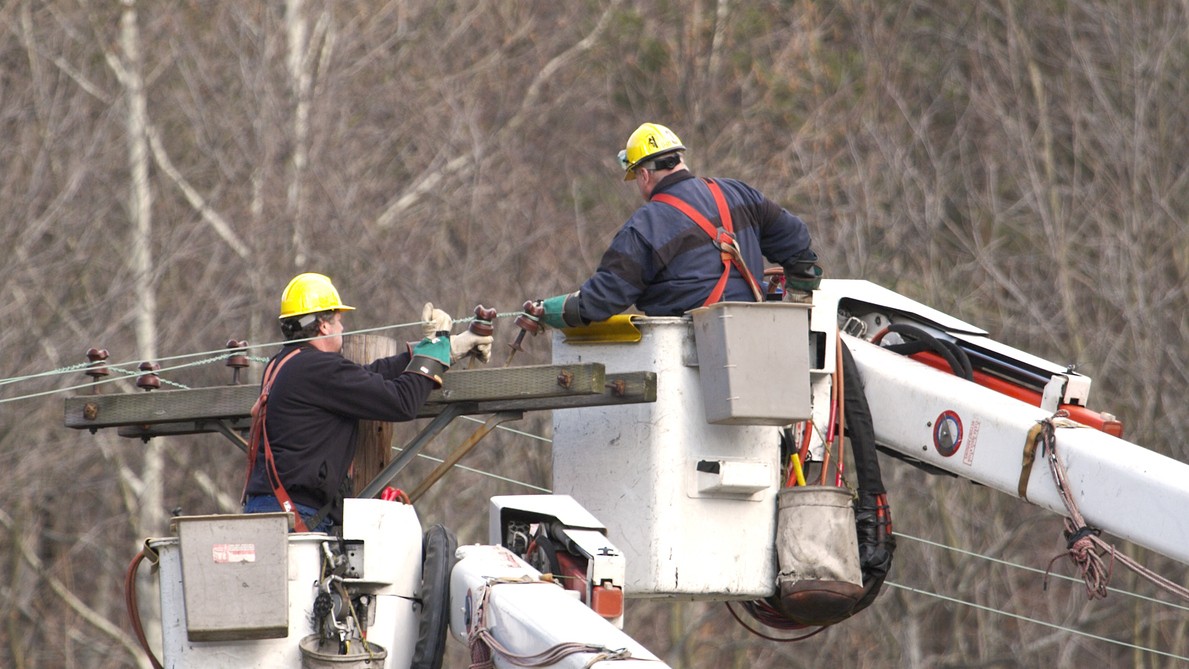
Investor-owned utilities, generation & transmission cooperatives, public power districts, federal power marketing administrations, merchant generators, and gas operators run Snap Schedule for 24/7 coverage, crew callouts, overtime equalization, and shift bidding.
A utility schedule has to do more than assign shifts.
It has to hold continuous 24/7 coverage across control rooms, plants, and service territories. Apply bargaining agreement rules for overtime distribution and callout order. Respect minimum rest and maximum consecutive hours. Restrict assignments to employees whose certifications are current. And scale up fast when a storm needs crews far beyond normal staffing.
Snap Schedule 365 handles all of it in one system, so the call list is built from live scheduling data instead of a nightly sync between separate products.
Your workforce runs on more than a shift schedule.
Control room coverage, bargaining agreement rules, overtime balances, employee qualifications, rest limits, outage callouts, and last-minute vacancies all have to work together.
“Who is working?”
- Start and end time
- Basic location or department
- Time off and availability
“Who should be called next, and why?”
- Position on the callout list, in the order your agreement sets
- Seniority, qualifications, availability, and work-hour limits
- Accepted, declined, expired, skipped, and mandatory opportunities
- The complete activity history behind the final assignment
Turn complex callout and overtime rules into a repeatable process.
Four scheduling problems bring utilities to Snap Schedule. Most operations recognize at least one of them. For the underlying mechanics, see how automated callouts work.
Automated crew callout
Identify who is eligible, then contact candidates one at a time in the order your agreement requires, each with a response window that advances automatically. Overtime ordering, seniority tiebreaks, charged declines, and escalation are built from your contract by our team and run inside your system. No IVR scripting, no separate callout platform.
Control room shift scheduling
Continuous watch rotations for system operators and pipeline controllers, with minimum rest, maximum consecutive hours, hours-of-service limits, documented deviations, and certification currency applied when the assignment is made rather than found in an audit.
Overtime equalization under a union contract
Overtime is defined differently at almost every utility. We build your definition into a callout rule — lowest accumulated balance, seniority tiebreak, charged refusals, list rotation — and it runs in your system alongside the standard eligibility rules.
Storm restoration and outage mobilization
Run an all-hands callout for an entire workgroup, assemble pre-defined crew complements made up of distinct roles, launch unlimited callouts at once across multiple locations, reassign positions mid-event, and release crews back to available as restoration winds down.
Most utilities run callouts on one system and the schedule on another.
A standalone callout platform wired into a separate workforce management system means two products, two databases, and a nightly sync between them — plus two versions of events when someone questions an assignment.
- The call list is always currentCandidates come from live schedules, overtime banks, and approved time off — not from data that synced hours ago.
- Eligibility comes from live dataAvailability, conflicting assignments, work-hour limits, position, skills, and location authorization are all evaluated from the current schedule.
- One screen answers the questionThe rules, the contacts, the responses, and the final assignment sit in a single exportable record.
sync Workforce management system
Two products, two records. Reconciling them is a manual job, and it happens under pressure.
The callout reads live scheduling data because it is the same data.
Schedule the rotations your operation actually works.
12-hour watches, DuPont and Panama (2-2-3) patterns, relief coverage, on-call and standby assignments, regular days off, and storm mobilization.
- Continuous rotationsDuPont, Panama, 4-on-4-off, and custom day and night patterns for around-the-clock operations.
- Coverage by positionMaintain required staffing by position, qualification, work area, and time period across every hour.
- Rest and work limitsMinimum rest between shifts, maximum consecutive hours, and rolling caps such as 16 hours or a maximum within any 48-hour window.
- Qualification eligibilityNERC system operator certification and CEH, gas Operator Qualification, and internal skills, with expiry alerts.
- Relief, on-call, and storm staffingPlan around vacations, training, and scheduled days off, then scale to full mobilization when restoration demands it.
Built for utilities of every size and structure.
Investor-owned, cooperative, public power, federal, generation, and midstream operations run the same rule engine — each with its own agreements and requirements.
Electric and gas utilities
Operations groups inside large IOUs run custom callout and overtime equalization rules built from their own bargaining agreements — without waiting on an enterprise program.
Generation & transmission co-ops
Whole-organization scheduling for co-ops serving distribution members across multiple states, where an enterprise callout platform is overkill.
Municipal utility boards
City-owned electric, gas, water, and wastewater systems replacing spreadsheets and phone trees, with the reporting a public body needs.
Power plants and merchant generators
Continuous plant staffing across multiple bargaining units, with rest rules, qualification requirements, and shift bidding by seniority.
Pipeline and gas operators
Control room staffing under hours-of-service and fatigue rules, with documented deviations and controller certification tracking.
Power marketing administrations
Federal power operations scheduling with the audit trail and record retention that public accountability requires.
Crews respond from anywhere. Schedulers stop chasing callbacks.
From a phone, tablet, or any browser — at home, in the truck, or on site. Employees see schedules, receive callout opportunities, accept or decline, bid on open shifts, request time off, punch in and out, and update availability.
- Fewer calls back to the schedulerEmployees answer the opportunity directly instead of phoning in, and the response lands in the record automatically.
- You control what is enabledManagers decide which self-service features each group can use, and which actions need approval.
- Changes reach crews in secondsSchedule updates, callout offers, and targeted messages go out by push, SMS, or email.
- Confirmed on-site attendanceGeofenced punch in and out lets schedulers compare planned against actual hours in real time.

Everything in one suite — no separately licensed modules.
Callout rules are why utilities choose Snap Schedule. The rest of the suite is why they stay.
Shift scheduling
Fixed, rotating, recurring, and variable schedules across unlimited locations, work areas, and employee groups.
Shift bidding
Annual and periodic shift bids with seniority-driven, rules-based awards, plus open shift management.
PTO accrual and tracking
Accrual policies, balances, transactions, approvals, and employee visibility into remaining time.
Time and attendance
Timecards, geofenced punch in and out, exceptions, and approval workflows tied to the schedule.
Reports and analytics
60+ configurable reports with export to PDF, Excel, CSV, and HTML, plus real-time dashboards.
Payroll export and integration
Out of the box, export payroll data in Workday, ADP Workforce Now, and SAP file formats, plus CSV, Word, and XML, or exchange data through the API. Bidirectional connectors to an existing HR or ERP system are built on the Snap Schedule 365 API.
Enterprise hosting, security, and availability.
Snap Schedule 365 is a vendor-hosted SaaS application deployed on Microsoft Azure, with the documentation your security review and RFP response will need.
Show us one of your difficult utility scheduling problems.
We build the demo around your operation, not a generic sample tenant. Bring the rotation that never balances, the callout sequence nobody can explain, or the grievance you are still arguing about.
What your utility demo can cover
- Your employee groups, classifications, and bargaining units
- Your rotation — 12-hour, DuPont, Panama, relief, on-call
- Your overtime equalization method and callout sequence
- Seniority rules, response windows, and escalation
- Certification and qualification requirements by position
- Rest limits and maximum consecutive hours
- The reports and audit trail your labor relations team needs
Enterprise-class scheduling without the enterprise rollout.
There are no servers to buy, no software to install, and no year-long implementation program. Configure the rules for one workgroup and run them in production, or deploy the whole suite across the organization. Implementation, configuration, training, and go-live support come from the Snap Schedule team, not a third-party implementer.
Start with your department. No corporate procurement cycle required.
Operations groups inside large investor-owned utilities run Snap Schedule with custom callout and overtime rules built from their own bargaining agreements. Configure your group’s rules, run them in production, and expand later if it works.
Request an Energy and Utilities DemoReplace the spreadsheet and the phone tree with the whole suite.
Generation & transmission cooperatives, municipal utility boards, and mid-size operators get contract-grade callout, overtime equalization, shift bidding, time off, and time and attendance in one system — within reach of a single operations group, a co-op, or a municipal board.
Request an Energy and Utilities DemoWatch a callout go from coverage gap to assigned shift.
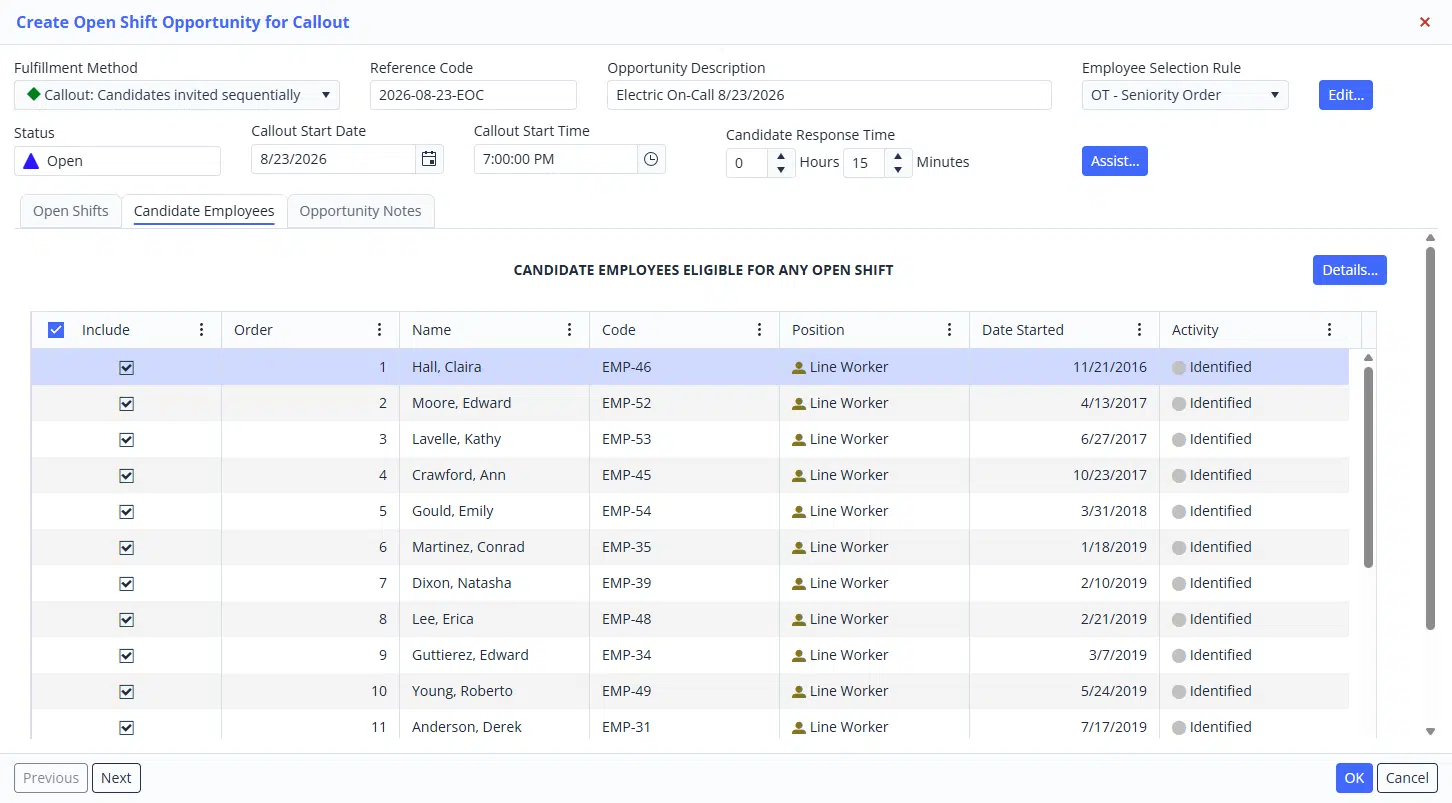
Create the open shift, pick the employee selection rule, review the candidates who qualify, and choose whether to contact them one at a time or all at once.
Then follow the responses as they arrive — who was offered the shift, who accepted, and who let the invitation expire — down to the wording of each text, email, and automated call, and the reply it received.
Every step is recorded, including which scheduler performed it and which steps ran automatically.
Utility and energy scheduling, answered.
What is the best employee scheduling software for utilities and energy companies?
The right choice depends on whether you need scheduling alone or scheduling with union-grade callout built in. Most workforce management suites treat scheduling as one module and require a separate callout platform bolted on for outage mobilization. Snap Schedule 365 combines 24/7 rotation scheduling, overtime equalization, automated crew callout, shift bidding, leave management, time and attendance, and reporting in a single product, so the call list is built from live scheduling data rather than a nightly sync. It is used by investor-owned electric and gas utilities, generation & transmission cooperatives, public power districts, federal power marketing administrations, power generators, and pipeline operators.
Does Snap Schedule handle union contract and collective bargaining rules?
Yes, and the work is split two ways. You configure eligibility yourself — availability, conflicting assignments, daily and work period hour limits, home location, and location authorization — into as many named rules as you need, applied per opportunity so different bargaining units follow different processes in one system. Contract mechanics such as ordering by accumulated overtime, seniority tiebreaks, charged declines, escalation from voluntary to mandatory, and list rotation are built by our team from your agreement, because overtime is defined differently at almost every utility. Once built, they run in your system and you maintain them through the rule settings.
What kinds of shift rotations can it schedule?
Fixed, rotating, recurring, and variable patterns, including 12-hour continuous rotations such as DuPont, Panama (2-2-3), and 4-on-4-off, plus 8-hour rotations, relief and regular-day-off coverage, on-call and standby assignments, split shifts, and temporary storm schedules. You can also assign tasks and breaks within a shift, which matters for control rooms and plants where coverage is by position rather than headcount.
Can it enforce rest periods, work-hour limits, and certification requirements?
Yes, and it applies them when the assignment is evaluated rather than catching them in an audit afterward. That includes minimum rest between shifts, maximum consecutive hours, and rolling caps such as a 16-hour limit or a maximum within any 48-hour period. Certification and qualification tracking ties shift and task eligibility to current credentials — NERC system operator certification and continuing education hours, gas Operator Qualification, and internal skills — with alerts before expirations affect eligibility.
Do we have to roll this out across the whole utility?
No. Snap Schedule deploys at the scale of the problem. A single operations group inside a large investor-owned utility can configure its own rules and run them in production without an enterprise workforce management program or a corporate procurement cycle, then expand later. Cooperatives, municipal systems, and mid-size operators typically deploy the whole suite across the organization at once.
Is it cloud-hosted, and can crews use it in the field?
Snap Schedule 365 is a cloud-hosted SaaS application available 24/7/365 from any modern browser and from native iOS and Android apps. Field crews view schedules, receive and respond to callout opportunities, bid on open shifts, request time off, update availability, and punch in and out with geofencing. Managers control which self-service features are enabled. Data is encrypted in transit and at rest on Microsoft Azure, with role-based permissions and a full access and change log. Tell us your data residency requirement and we will confirm it directly.
Does it work for oil, gas, and pipeline operations as well as electric utilities?
Yes. The same rule engine that handles electric utility line crew callouts handles gas distribution, midstream pipeline control rooms, power generation plants, and water and wastewater operations. Pipeline control rooms in particular use it for continuous controller rotations under hours-of-service and fatigue-management requirements, with documented deviations and controller qualification tracking.
Bring us your hardest scheduling or callout rule.
We will build the demo around your employee groups, rotations, overtime procedure, callout sequence, seniority requirements, qualifications, and escalation rules — and show you exactly how they run.