


Manufacturing & industrial plants
Employee scheduling software for plants that run on shifts
Build the crew rotation once instead of rebuilding it every week. Cover a 4:50 a.m. call-off — whether your plant calls it calling off, calling in or calling out — without working down a paper phone list. Show a steward exactly who was called, in what order, and what they said.
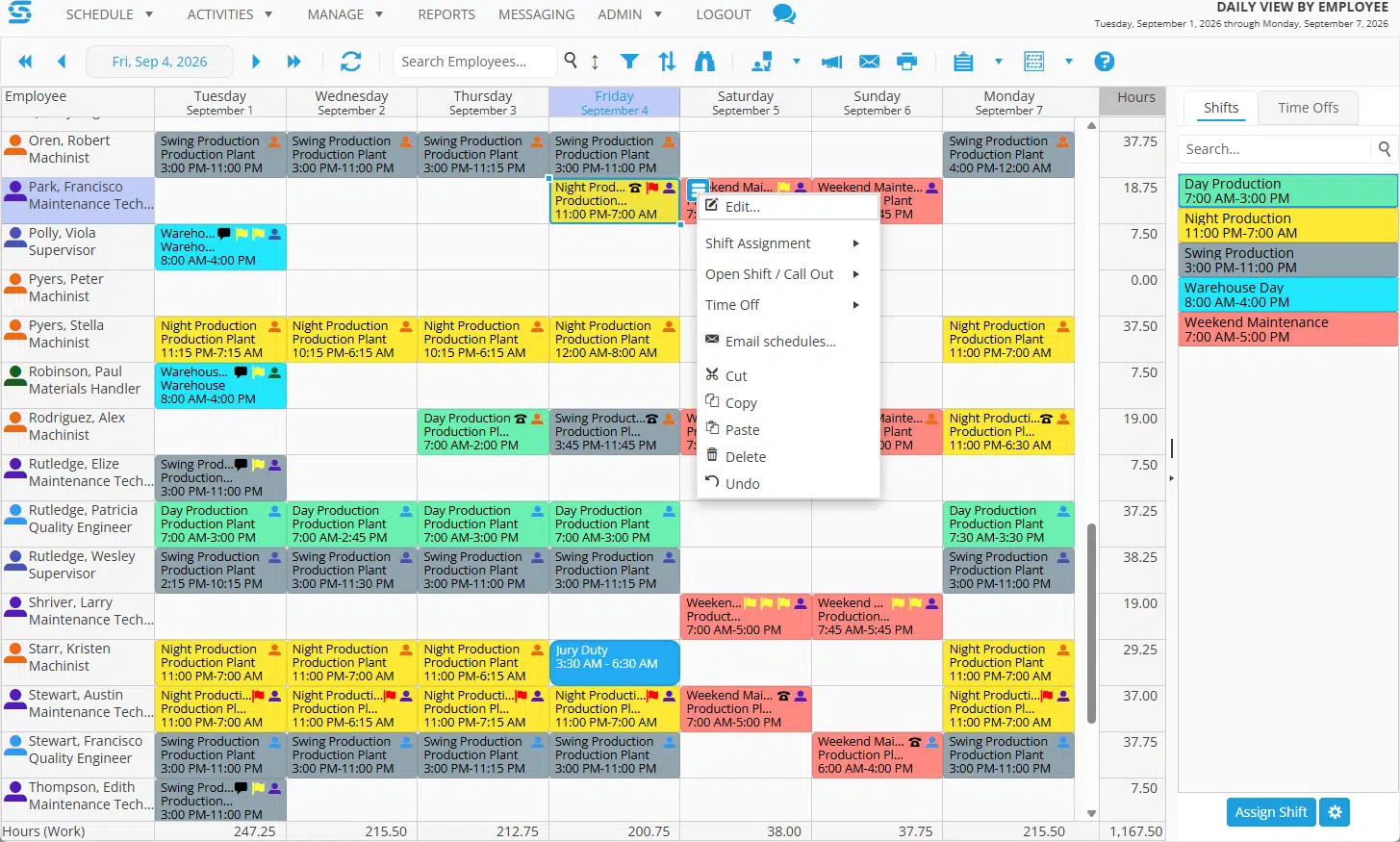
Scroll sideways to see the full week →
Manufacturers using Snap Schedule
Food and dairy processing, building controls, lighting and electronics, packaging machinery, beverage production, water treatment chemicals.






First, a definition
This schedules people, not machines
Search for manufacturing scheduling software and most of what comes back schedules production: jobs, work orders, machine capacity, changeovers, OEE. That is a different category of product and Snap Schedule is not in it.
Snap Schedule schedules the workforce. Which operators are on B crew nights next month. Who is qualified to run Line 3 when the regular lead calls off. How overtime hours accumulated across the maintenance group this quarter. If your production planning already lives in an ERP or MES, this sits alongside it and answers the staffing question.
Who this fits
- Any operation that runs on shifts, from a single plant to a multi-site manufacturer
- Fixed shifts, rotating crews, split shifts, on-call and overlapping coverage
- Any number of crews, any shift length, any cycle length you care to define
- Union plants where overtime distribution is governed by contract
- Non-union plants with an internal overtime policy they want to apply consistently
- Operations where certifications decide who can run what
- Schedulers working in a spreadsheet, on a whiteboard, or in something they have outgrown
There is no cap on employees, crews, shifts, locations or pattern length. If your operation runs on shifts, it can be built.
What actually goes wrong
Three problems that eat a scheduler’s week
The call-off before day shift
An operator calls off fifty minutes before the line starts. Somebody opens a binder and starts dialing. Twenty minutes later the line is short, three people have been woken up for nothing, and nobody wrote down who said no.
Rebuilding the rotation by hand
Four crews, two shifts, a repeating cycle that is genuinely simple on paper. In a spreadsheet it still takes half a day, and one dragged cell puts a crew on days when they should be on nights.
Proving the overtime was fair
Someone believes they were skipped. The contract says the hours should have been offered in a particular order. The evidence is a phone list with pencil marks on it, and the burden of proof is on the plant.
Crew rotations
Build the pattern once, then stop touching it
Define your shifts, define your crews, and assign a repeating pattern. DuPont, Pitman, Panama, 2-2-3, fast and slow 8-hour rotations, 5-3 5-4 5-3 tens, mixed 8-and-12 weeks. The pattern generates forward, so next quarter’s roster exists before anyone asks for it.
Snap Schedule warns you about conflicts as you schedule rather than after you publish, and it tracks position, team, skills and authorized work locations so an unqualified operator does not end up on a station they cannot run.
Employee records import from a formatted Excel file, which matters if the plant’s roster currently lives in one.
Patterns we have already written up
Every one of these is documented with its cycle, crew count and average weekly hours, and every one can be built in Snap Schedule.
- DuPont — 4 crews, two 12s, 42 hours a week
- Pitman — 4 crews, fixed days and nights
- 2-2 3-2 2-3 — the rotating 12-hour standard
- Fast 12 and Extended 12
- Rotating 8-hour and 8-plus-12 combinations

Scroll sideways to see the full pattern →
Inside the shift
Who is on Line 2 at 3 p.m., and who is covering their break
A shift assignment says an operator is in the building. It does not say which station they are on, when they take lunch, or who runs the forklift while they do. Tasks handle that layer.

Scroll sideways to see the full day →
Stations, activities and breaks
Assign a shift first, then schedule tasks inside it: a work station, a line, an activity, a project, or a lunch break. Tasks can be any duration and go on by drag and drop.
Only who is authorized
Each task carries its own list of authorized employees, so a forklift task offers only forklift-qualified operators. Tasks can also carry their own available hours, for a station that opens and closes.
Coverage by the hour
The graph under the grid shows how many people are assigned to each task in each time block, so a thin patch over the lunch hour is visible before it becomes a stopped line.
Automated callout
How filling that 4:50 a.m. hole actually works
Most scheduling vendors describe their callout engine in language broad enough to cover anything. Here is the specific mechanism, so you can tell before a demo whether it matches your procedure.
The sequence
You create an open shift from the coverage gap. You pick an Employee Selection Rule, which decides who is eligible. Snap Schedule then contacts candidates one at a time, in rule order.
Each candidate gets a response window you set. If it expires with no answer, the system moves to the next name automatically. Accepting turns the offer straight into an assignment.
Notification goes out by SMS, in-app message, or voice call. Every contact, response, decline and expiry is logged with a timestamp, which is the artifact you hand a steward.
Callout is sequential. Bidding is simultaneous.
These are two different fulfillment methods and it is worth being precise about which one you need.
Callout works down a list in order, one person at a time. That is the right shape when a contract specifies a calling order.
Shift Bidding notifies every eligible employee at once, opens a bidding window, and awards the shift when it closes. That is the right shape for planned overtime posted in advance. Snap Schedule does not contact multiple candidates simultaneously inside a Callout.

Scroll sideways to see the full candidate list →
Every candidate carries an order number and a status, and the fulfillment method is set on the opportunity itself — here, shift bidding, where candidates bid simultaneously. A callout uses the same candidate list and works down it one name at a time instead. The rule named in the top right is what decides who appears and in what order.
What the standard rules check, and what they do not
Snap Schedule ships with standard rules that work out of the box, and supports custom rules written for the way a particular plant operates. Knowing which of your requirements falls where is the most useful thing you can bring into a demo. A standard Employee Selection Rule screens for eligibility: it answers “may this person take the shift,” not “whose turn is it.”
Standard rules, out of the box
- Available to work this shift
- No other assignment on that date
- Hours including this shift within daily limits
- Hours within work-period limits
- Home location matches
- Authorized to work at this location
- Narrowing by allowed positions and required skills
- Unlimited named rule combinations for different situations
Custom rules, built by our engineering team
- Ordering candidates by accumulated overtime
- Seniority as a tiebreak
- Charged declines
- Voluntary-to-mandatory escalation
- List rotation across callouts
- Cascading through roles to fill a crew
- Rest-limit eligibility checks
- Any plant-specific definition of an overtime hour
Overtime equalization ordering is a custom rule. Almost every plant defines an overtime hour a little differently — worked versus offered, charged versus refused, which classifications share a list — so rather than guess, our engineering team builds yours to match your procedure and quotes it separately from the subscription. Most of our customers run at least one custom rule, and we are glad to scope yours early so there are no surprises later.
Overtime and fatigue
Know the overtime number before the pay period closes
Standard rules will stop you assigning someone past a daily or work-period hour limit while you schedule. That is prevention, and it is the part that is free.
For everything after that, the answer is reporting. Snap Schedule ships more than 60 standard reports covering work assignments, coverage, labor cost, overtime and time off. Filter, sort and group them, save a configuration and rerun it later with fresh data, and export to PDF, Excel or CSV.
In practice the useful habit is a weekly accumulated-overtime report by employee, so distribution is visible while you can still do something about it rather than after a grievance is filed.
Hour limits and rest rules
Daily and work-period hour limits are standard, and they will keep you from assigning someone past them while you build the schedule.
A minimum-rest-between-shifts rule — a set number of hours off before the next start — is a custom rule, written to whatever your contract or policy specifies.
Worth remembering either way: where fatigue is a safety concern, the pattern itself does more work than any rule. Forward rotation and adequate consecutive days off are decisions made when the rotation is designed.
Skills and certifications
Certifications that gate the station, tracked where the schedule is
Forklift, lockout/tagout, confined space, overhead crane, welding procedure qualifications, hazmat, first aid. Record them against the employee with an expiration date, and require them on the shift so an operator without the qualification cannot be assigned.
A standard Employee Skill/Certification Expiration List report shows what has already expired and what is about to, which turns a recurring compliance scramble into a report you run on a schedule.
Employee records also carry position, team, authorized work locations and up to 25 custom fields, so plant-specific attributes you already track have somewhere to live.

Sorted by days to expiration, so the four already lapsed sit at the top of the page rather than surfacing during an audit.
Time, attendance and payroll
Planned hours, actual hours, and the file payroll wants
Employees punch in and out against their assigned shift, from a virtual time clock at the plant or from the employee app with GPS. Set a geo-fence around the site if you need certainty that a punch happened on site. Schedulers see punch activity live; variance reports show planned against actual for any date range.
Time card data goes out through Export to Payroll, which includes standard formats preset to what ADP, SAP and Workday expect, plus a custom option where you choose the fields, the period, and whether to send scheduled or actually-worked hours.
On integration, plainly
Two mechanisms cover the ground, and it is worth knowing which one you need.
Export to Payroll produces a file in the format your payroll system expects. This is configuration, it is included, and for most plants it is the whole integration story.
The Snap Schedule 365 REST API (v2, generally available) exposes scheduling data to build against — an HRIS sync, a data warehouse feed, an ERP hand-off — developed by your team or by ours.
The employee side
What the operator sees on their phone
Their schedule, without asking
Current and upcoming assignments, co-worker shifts where you allow it, and notifications when something changes. You control which features are enabled and who sees what.
Open shifts and callouts
Callout offers and bid invitations arrive on the phone and can be accepted from it. Accepting an offer creates the assignment directly, with no scheduler re-keying.
Time off and trades
Requests submitted with day, time and reason. Shift trades and give-aways, with or without manager approval, limited to the same position, team or location if you want that.
Punch in and out
Punching against the assigned shift, with GPS coordinates recorded and geo-fence enforcement available.
Time cards
Planned versus actual hours for the current, previous or next pay period, including overtime, on-call and paid or unpaid time off, with employee sign-off.
Plant messaging
Message topics targeted at people working a given shift, location, position or skill, with read confirmation and a full history for the scheduler.
Product tour
See it running

A walk through the scheduler interface: building a rotation, spotting a coverage gap, opening a callout and watching it work down the candidate list.
If you would rather see your own crew structure than a demo database, that is what the personalized demo is for.
Go deeper
Related reading
Questions we get from plants
Frequently asked questions
Is this production scheduling software?
No. Snap Schedule schedules people, not jobs or machines. It does not handle work orders, machine capacity, changeover sequencing or OEE. If you are looking for advanced planning and scheduling to sequence production, that is a different category of product. Snap Schedule answers who is working which shift, on which line, with which qualifications, and what it costs in hours and overtime.
Can Snap Schedule handle our collective bargaining agreement?
Partly as standard configuration, partly as engineering work, and the honest answer depends on which clauses you mean. Eligibility screening is standard: availability, conflicting assignments, daily and work-period hour limits, home location and location authorization, plus narrowing by position and required skill. Ordering candidates by accumulated overtime, seniority tiebreaks, charged declines, voluntary-to-mandatory escalation and list rotation are custom rules that BMS builds, quoted as a one-time engineering project separate from the subscription. The productive first conversation is sorting your clauses into those two buckets, which we can do from the contract language.
Does the automated callout contact everyone at once?
Not within the Callout fulfillment method. Callout is sequential by design: one candidate at a time in rule order, each with a response window you set, advancing automatically when a window expires. If you want simultaneous notification, that is the Shift Bidding method, which notifies all eligible employees at once, opens a bidding window and awards the shift when it closes. Many plants use both, for different situations.
How does Snap Schedule notify employees about an open shift?
By SMS, in-app notification through the employee app, or automated voice call. Email is not a notification channel for callouts. Every contact attempt and every response is timestamped and logged.
Does it equalize overtime across the crew automatically?
Ordering candidates by accumulated overtime is a custom rule built by BMS, not a standard setting you switch on. The reason is that overtime is defined differently at nearly every plant: worked hours versus offered hours, whether a decline is charged, which classifications share a list, how the clock resets. Because there is no single definition to build against, BMS implements yours as scoped engineering work with its own quote. The standard product gives you the reporting to see distribution and the audit log to defend it.
Can it build a DuPont, Pitman or 2-2-3 rotation?
Yes. Define the shifts and crews, then apply a repeating pattern that generates forward, so future periods exist without rebuilding anything. We have published write-ups of the common 24/7 patterns with their cycles, crew counts and average weekly hours, including DuPont, Pitman, Panama, 2-2 3-2 2-3, fast and extended 12s, rotating 8s and mixed 8-and-12 arrangements.
Will it stop us scheduling someone into too many hours?
Standard rules check that an employee’s hours including the shift in question stay within daily limits and within work-period limits, and will exclude them as a candidate if they do not. A minimum-rest-between-shifts check, for instance requiring a set number of hours off before the next start, is a custom rule rather than a standard one. Snap Schedule also warns about scheduling conflicts as you build rather than after you publish.
How does it track forklift, LOTO and other certifications?
Skills and certifications are recorded against each employee with expiration dates, and shifts can require specific skills so that only qualified employees appear as candidates for an assignment or a callout. A standard Employee Skill/Certification Expiration List report shows both what has already expired and what is coming due, so renewals get handled on a schedule rather than discovered at an audit.
Does it integrate with our ERP or payroll system?
Two mechanisms are available. Export to Payroll converts time card data into a file, using standard formats preset to what ADP, SAP and Workday expect or a custom layout where you select the fields, the date range, and whether to export scheduled or actually-worked hours. Separately, the Snap Schedule 365 REST API version 2 is generally available and exposes scheduling data for an integration your team or ours develops, such as an HRIS sync, a data warehouse feed or an ERP hand-off.
Can employees punch in and out, and can we verify they are on site?
Employees punch against their assigned shift from a virtual time clock at the plant or from the employee app. A geo-fence can be set around each location, and punches record GPS coordinates, so you can confirm a punch happened on site. Network restriction by IP address is available where employees punch over plant Wi-Fi. Schedulers see punch activity in real time and can report planned against actual hours for any date range.
How many plants and employees can one license cover?
You license schedulers rather than headcount. A single scheduler license covers an unlimited number of employees across an unlimited number of locations, so a multi-plant manufacturer is not charged by employee count. Employee app access is a separate add-on and volume discounts apply. Current figures are on the pricing page.
What reporting comes standard?
More than 60 standard reports covering employee activity, work assignments, labor cost, coverage, overtime and time off. Reports can be filtered, sorted and grouped, saved with their settings for later reruns against fresh data, and exported to PDF, Excel or CSV. For most plants the reports that matter are accumulated overtime by employee, planned versus actual hours, coverage by position, and the certification expiration list.
See it against your own crew structure
A personalized demo is worth more than a trial database here, because the useful conversation is sorting which of your rules are standard configuration and which need building. Bring your rotation and your overtime procedure and we will tell you which is which, including what the second category would involve.
Prefer to talk to someone about licensing? Call 1-800-450-4230, Monday to Friday, 9 a.m. to 5 p.m. Pacific.