


Police scheduling software built around the duty roster.
Districts, watches, sectors, beats, and posts — with callouts filled in the order your agreement requires and a record that holds up months later.
Published pricing · 30-day free trial, no sales call required
Municipal and metropolitan police departments, county sheriff’s offices, campus and school district police, and public safety dispatch centers run patrol rosters, rotations, minimum staffing, overtime, callouts, seniority bids, and officer self-service on Snap Schedule.


One system, from the annual bid to the punch clock.
Agencies adopting law enforcement scheduling software usually replace three or four things at once — the rotation spreadsheet, the callout phone list, the leave binder, and whatever tracks certifications. Here is the whole scope of what Snap Schedule 365 covers, in plain terms.
Roster View
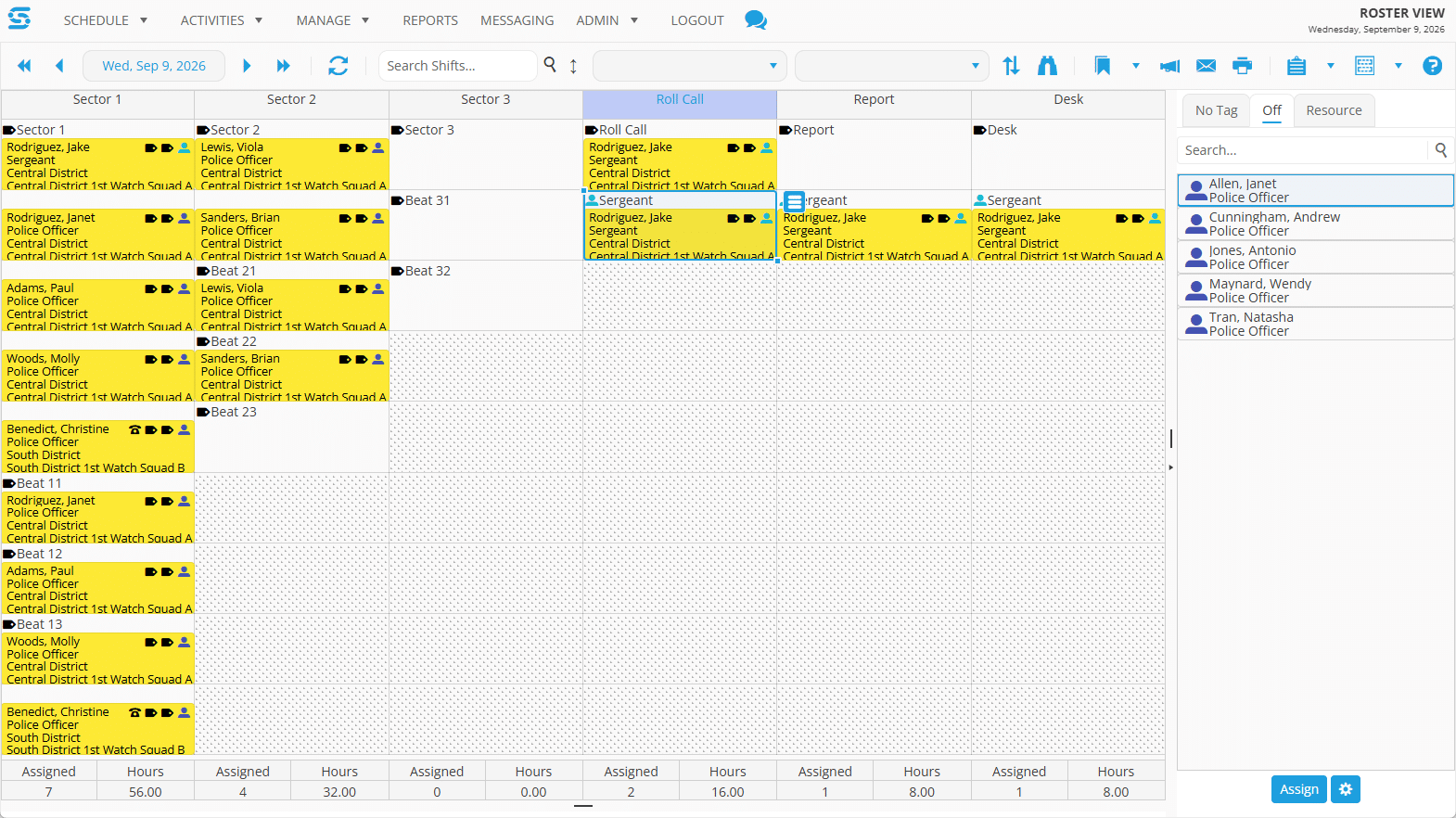
The schedule by district, watch, and section. Columns are your beats, units, and posts; rows are the slots inside them.
Callout and mandation
Sequential contact in rule order, response windows, auto-advance on expiry, and full candidate state tracking from identified through assigned.
Shift bidding
Simultaneous notification to everyone eligible, officers submit bids, you award. Plus the Annual Bid View for seniority bid cycles.
Rotations and patterns
8-, 10-, and 12-hour rotations, Pitman, power and overlap shifts, built as shift patterns and schedule plans, then generated forward.
Temporary deployments
Dated transfers that move an officer into a receiving district for the duration — task forces, details, loans between commands.
Leave and accruals
Requests, approvals, accrual policies, balances, and one-click conversion of an approved leave into an open shift.
Skills and certifications
FTO, K-9, motor, breath test operator, crisis intervention, firearms currency — with expiration reporting and validation flags.
Time and attendance
Virtual time clocks and mobile punch with location verification, planned versus actual hours, time cards, and payroll export.
Reporting
Over 60 reports covering coverage, overtime, certifications, callout history, and schedule changes, with saved settings and exports.
The duty roster, finally built the way agencies actually read it.
The duty roster predates all of this software. Agencies have organized watches by district, sector, beat, and post for as long as there have been patrol divisions, because coverage is the thing that has to be accounted for — not headcount. A schedule that cannot show you an uncovered beat is answering the wrong question.
Roster View is that structure, designed into Snap Schedule 365 as a first-class part of the product. Columns are the sections you define — beats, units, posts. Rows are the slots inside them. Districts and watches drive what you are looking at, and you assign by dragging an officer onto a slot.
- Structured the way your agency isSections run as columns — Sector 1, Sector 2, Roll Call, Report, Desk — and beats nest underneath the sector they belong to.
- Assign from the officers who are actually freeA searchable side panel lists officers who are off or untagged for the date, and you assign straight from there onto a slot.
- Placement follows the officer, not the shiftDistrict and watch come from an officer’s home location and team, so the roster shows where they are posted — and a temporary deployment moves them for its duration.
- Section notes where they get readNotes attach to the roster and to individual sections, appearing under the column header while you are staffing that beat.
- Enabled for your agencyRoster View is part of Snap Schedule 365. We turn it on and configure your districts and sections as part of your setup.
What to ask about on a demo
A duty roster is a different object from a schedule grid: it is organized around the posts that have to be covered, not the people available to cover them. Come with your district and sector structure in mind and we will walk through how districts, watches, and sections would map onto it.
What it does not do
Roster View shows assignments and slots. Open shift opportunities and callouts are worked in Daily View by Shift and the Open Shift View, and the full sequence comes back afterward in the Open Shift Opportunity Details report.
Know the watch is short at 0500, not at roll call.
Minimum staffing is a number every agency has and few systems track properly — so many officers on patrol, a sergeant on each sector, a supervisor on duty at all times. Whether a shortage becomes a routine callout or a scramble usually comes down to how early somebody noticed.
In Snap Schedule the requirement lives on the shift and on the roster section rather than in a supervisor’s head. Shift requirements say how many of each position a watch needs. Section cell counts say how many slots a beat or unit puts on the roster. Shift View counts what is scheduled against those requirements by position, skill, or tag, and the dashboard charts scheduled coverage against requirements with a forecast.
The roster totals assigned officers and hours for every section along the bottom of the view, so a sector sitting at zero is visible next to one carrying seven. An uncovered slot shows as an empty cell, and from there it becomes an open shift opportunity that goes out by callout or bid.
Per watch and district
Requirements are set where the work is — a district’s day watch can carry a different minimum than its midnight watch, and a specialty unit its own.
By rank, not headcount
Six officers or deputies on a sector is not coverage if none of them is a sergeant. Requirements are entered by position, so a supervisory gap reads as a gap.
Qualification-aware
A motor slot needs a motor-qualified officer, a K-9 slot a handler. Skills gate the slot, so an unqualified fill is flagged rather than quietly counted.
Down to the shift change
Coverage Analysis charts required against scheduled hour by hour for a date, at intervals as fine as 15 minutes — narrow enough to show the gap that opens at handover.
When the callout is challenged, can you show the sequence?
Every scheduling product on your shortlist will tell you it automates callouts. The harder question is what happens ninety days later, when a union representative says the wrong officer was called. That is decided on evidence, and in many agreements the remedy is money.
A bypass is paid twice
Overtime grievance clauses commonly require the agency to pay the bypassed officer at premium rates for the missed opportunity — and specify that the officer is not required to work or make up those hours. The shift gets covered once and paid for twice.
The record is usually the weak point
Public audits of police overtime keep finding the same gap. One municipal audit reported that documentation could not be located for the large majority of paid overtime instances, and that scheduling and payroll could not be efficiently reconciled.
Recollection is not evidence
Without a system-generated sequence, a challenged assignment comes down to a supervisor’s account against an officer’s. That is a poor position in arbitration and a worse one to be in repeatedly.
What a callout in progress actually looks like
One opportunity, mid-run. The numbered markers point to the parts that decide whether the assignment survives a challenge.

Scroll the image sideways to see the full window.
- Candidates invited sequentially. The fulfillment method is set on the opportunity itself. One officer is contacted at a time, in order — not a message to everyone at once.
- A named selection rule. The rule that produced this candidate list is recorded on the opportunity, so the ordering is attributable months later rather than reconstructed.
- A defined response window. Two hours here. When it expires without an answer, the callout advances to the next candidate on its own.
- An explicit order. Candidates are numbered. This is the sequence a grievance will ask about, and it is recorded before anyone picks up a phone.
- A state per candidate. Rejected, offered, identified. Every officer in the pool carries a status, including the ones never reached.
And what it leaves behind
Each contact is a recorded conversation — the message sent, the channel, the number it went to, the officer’s reply, and a timestamp on every step. Officer Adams declined this one. The log shows when the offer went out, when he responded, what he sent, and when the exchange closed. That is the form a bypass grievance takes when it arrives.

In the order the contract specifies
Sequential by design, each candidate with a window to respond before the next is contacted. That is what “call in order” clauses require, and it is not the same as notifying everyone at once.
Simultaneous when the clause calls for it
Where the agreement puts a shift out to all eligible officers, Shift Bidding notifies everyone at once and you award among the bids received.
Call-back and holdover, the same way
Both run the same ordered process and land in the same record, so an end-of-watch extension is as defensible as a planned vacancy.
Come with your callout procedure in hand
We will run a callout end to end on a live system and show you the record it produces — the same report that answers a grievance months later. Then we will go through your ordering procedure clause by clause: which parts are standard eligibility you would manage yourself, and which are rules our engineering team builds for your agreement. You will leave knowing which is which, and what the second part involves.
Your union rules, written by our engineering team.
Every agency’s agreement is different, so the mechanics that decide callout order cannot be a checkbox. Our engineering team reads your agreement and builds those rules as part of bringing you onto the system — you are not handed a scripting console and asked to translate contract language yourself.
Standard eligibility
On every account, managed by your administrators.
- Available to work the shift
- No conflicting assignment that date
- Hours within daily limits
- Hours within work-period limits
- Home location matches
- Authorized at this location
- Unlimited named rule combinations, plus per-shift narrowing by home location, allowed positions, and required skills
Agency-specific mechanics
Written by our team from your agreement. Nearly every agency has some.
- Ordering by accumulated overtime hours
- Seniority ordering and seniority tiebreaks
- Charged declines, where a declined offer counts as worked
- Voluntary-to-mandatory escalation after volunteers are exhausted
- Mandation by inverse seniority, with list rotation
- Cascading by rank or role
- Rest-limit eligibility checks and agency overtime definitions
Rule building is scoped engineering work, quoted separately from your subscription, and it is where most of the value in a police deployment sits. Have your agreement to hand when we talk so we can tell you early which clauses are standard configuration and which need building.
Reports agencies actually run.
Scheduling decisions get questioned months later — by a union representative, a city auditor, or a records request. These are the reports that answer.
See Snap Schedule 365 at work.
Building a schedule, filling an open shift, and putting the schedule in officers’ hands — a short look inside the software.
A demo goes further — a live system, your questions, and a conversation about how your watches, rotations, and callout procedure would be set up.
Working through a specific question?
Questions police schedulers actually ask.
Is Snap Schedule 365 actually built for police, or is it a general scheduler with a police page?
The core scheduling engine serves many industries, and law enforcement has its own layer on top of it: Roster View with districts, watches, and sections; temporary deployments; annual seniority bidding; and callout ordering built from your collective bargaining agreement. There is a dedicated law enforcement configuration we enable on agency accounts, and a law enforcement section in the product documentation. The same configuration serves county sheriff’s offices, campus and school district police, and dispatch centers.
What is police scheduling software?
Police scheduling software builds and manages duty schedules for a law enforcement agency: patrol rotations across watches, assignment of officers to districts, sectors, beats, and specialty units, minimum staffing per watch, overtime and callouts filled in the order a collective bargaining agreement requires, leave and certification tracking, and the reporting that documents how each assignment was made. It differs from general workforce scheduling in three ways — it works against a duty roster rather than an employee list, it calculates overtime against an FLSA 207(k) work period rather than a 40-hour week, and it has to produce an audit trail that survives a grievance.
Can Snap Schedule contact officers one at a time in seniority order?
Yes. The Callout method is sequential by design — officers are contacted one at a time in the order the selection rule produced, each with a defined window to respond before the next is contacted. That is the behavior most agreements require. When you want everyone notified simultaneously instead, Shift Bidding offers the shift to all eligible officers and you award among the bids received.
Who sets up the seniority and overtime equalization rules?
Your administrators configure standard eligibility — availability, conflicting assignments, daily and work-period hour limits, home location, and location authorization. The contract mechanics are different: ordering by accumulated overtime, seniority ordering and tiebreaks, charged declines, mandation by inverse seniority, and list rotation are built by our engineering team from your actual agreement. Customers do not write rule scripts themselves — that work is ours.
What is Roster View and how is it different from a normal schedule grid?
Roster View arranges the schedule by district, watch, and section rather than by employee or shift. Columns are your beats, units, and posts; rows are the slots within them. It is driven by the districts and sections you define, and an officer’s placement follows their home location and team rather than the location on a shift — so the roster reflects where they are posted. We enable and configure it for law enforcement accounts.
Does Snap Schedule support FLSA 207(k) work periods instead of a 40-hour week?
Yes. Law enforcement agencies that have declared a 7-to-28-day work period under the FLSA 207(k) exemption need overtime calculated against that period, not a flat workweek. Overtime settings support daily, work-period, and seventh-consecutive-day thresholds, each with tiers, so hours are tracked against the work period your agency declared. Seventh-day and daily overtime do not stack — the higher-paying rule applies — and daily overtime is deducted from period overtime, so layered rules never double-pay.
Are rest and consecutive-day limits enforced automatically?
They are flagged, not blocked. Work-hour limits, rest requirements, and consecutive-day maximums are configured once and surfaced by schedule validation as advisory flags for a supervisor to review. They tell you an assignment crosses a line; they do not prevent it. Certification validations behave the same way and ship switched off, so turn them on deliberately.
Can we set minimum staffing levels per watch and district?
Yes. Shift requirements record how many of each position a watch needs, and roster sections carry cell counts for the slots a beat or unit puts on the roster. Roster View totals assigned officers and hours per section along the bottom of the grid for the date you are viewing, Shift View counts scheduled against required by position, skill, or tag, and the dashboard charts coverage against requirements with a forecast. Requirements are entered by position, which means a missing sergeant reads as a coverage gap rather than being absorbed into a headcount. Coverage Analysis is a separate hour-by-hour report for a single location and date, useful for seeing exactly where a gap opens around a shift change.
Does Snap Schedule work with our payroll and HR systems?
Yes. Snap Schedule 365 exchanges data through its API, and payroll data can be exported in CSV format to systems including Workday, ADP, and SAP. Time card data covering regular, overtime, on-call, and paid and unpaid time off exports to your payroll provider, so scheduled and actual hours reconcile against what gets paid — the gap that municipal overtime audits most often flag.
How are officer leave requests and their coverage impact handled?
Officers submit time-off requests from the mobile app choosing the date, time, and reason. A supervisor sees the request alongside its coverage impact before deciding, and an approved request can be converted directly into an open shift opportunity to be filled by callout or bid. Accrual policies, balances, and transaction history are tracked in the same record, so a request is evaluated against both the officer’s balance and the watch it would leave short.
What does it cost, and can we try it before talking to sales?
Pricing is published on our pricing page rather than gated behind a quote request, and a 30-day free trial starts without a sales call. Rule building for a collective bargaining agreement is scoped and quoted separately from the subscription, so agencies with union rules generally want a demo and a conversation before committing.
How do we know it will follow our collective bargaining agreement?
Talk it through with us. A demo covers the standard system in full — eligibility rules, callout order, response windows, bidding, and the reporting behind them. From there we go through your agreement clause by clause and tell you which provisions are standard configuration, which need rules built by our engineering team, and roughly what that work involves. Getting a straight answer on that split early is worth more than a scripted demonstration, and it is a fair question to put to every vendor on your shortlist.
Talk to someone who has done this before.
Bring the staffing problem that prompted you to look — the watch that keeps coming up short, the callout that got grieved, the bid cycle that eats a month. We will show you how Snap Schedule 365 handles it and be straight with you about what your agreement would need built on top.