


Know who is working, where they’re assigned, and who can cover—before the day starts.
Library scheduling means more than filling shifts. You’re assigning service desks by the hour, covering programs with qualified staff, tracking who can work at which branch, and rebuilding the plan every time someone calls out. Snap Schedule 365 connects all of that in one place.


Snap Schedule is used by public library systems across the United States and beyond, including large city, county, regional, and multi-branch library systems.
Setting the standard in library scheduling.
“[Snap Schedule] has been amazing [with] direct assistance, working with us on specific enhancements [based on] our suggestions. … They have been easy to contact, responsive, and courteous, and their experts truly understand their product. … [Snap Schedule] is truly valuable and worthwhile.”
— Modern Library Awards Judges
Snap Schedule earned a 2026 Modern Library Awards Multi-Year Platinum Award for sustained excellence in library staff scheduling software.
Your library runs on more than a shift schedule.
Library managers must coordinate regular work hours, hourly service-point assignments, programs, projects, breaks, qualifications, time off, and last-minute coverage. Snap Schedule connects library staff scheduling, multi-branch coverage, service-point scheduling, and task scheduling in one system.
- ✓Start and end time
- ✓Basic location or department
- ✓Time off and availability
- ✓Branch, department, desk, program, task, meeting, and break assignments
- ✓Required skills, positions, and authorized locations
- ✓Coverage gaps, conflicts, open shifts, and eligible substitutes
Schedule the shift. Then schedule the work inside it.
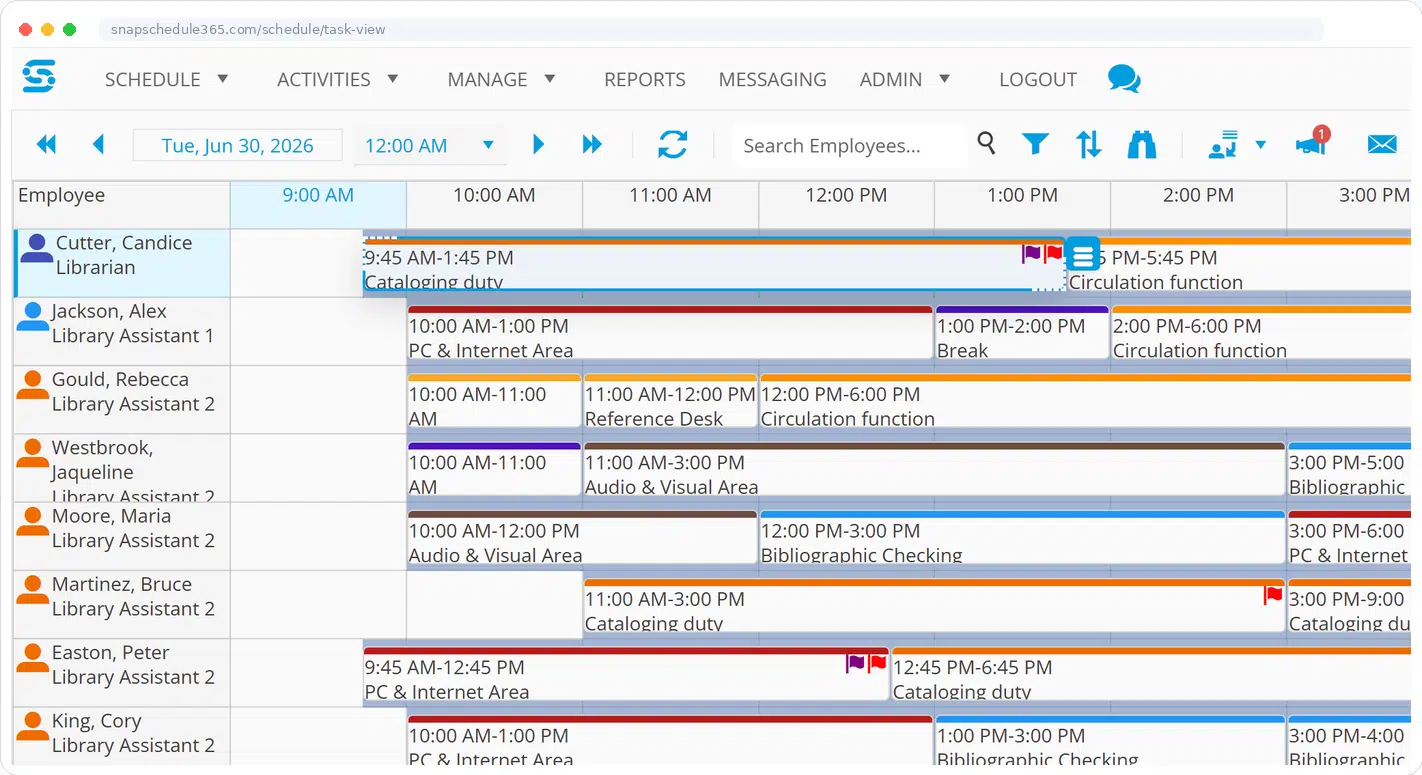
Create the employee’s regular work schedule, then assign service desks, programs, projects, meetings, breaks, opening or closing duties, and other activities throughout the day.
Task requirements help managers define what coverage is needed by location, position, skill, date, and time—and see what remains unfilled before schedules are published.
Explore Task & Break Scheduling →Replace disconnected spreadsheets, calendars, emails, and phone lists.
Bring the most important parts of library workforce scheduling together while preserving the policies and approvals your organization requires.
Employee shifts
Create fixed, rotating, split, recurring, and variable schedules for full-time, part-time, substitute, volunteer, intern, and seasonal staff.
Shift management →Service points and tasks
Assign desks, programs, projects, duties, meetings, and breaks within each shift, with requirements based on positions and skills.
Task scheduling →Branches and qualifications
Authorize employees by branch, department, position, skill, task, and team so managers can find people who are both available and qualified.
Skills and qualifications →Time off and availability
Receive requests, apply approval rules, update coverage, and prevent assignments that conflict with availability or approved leave.
Leave and time off →Open shifts and callouts
Identify eligible employees, contact them in the required order, use shift bidding, award openings fairly, and preserve a complete audit history.
Open shift management →Employee access and communication
Let employees see shifts and tasks, request time off, update availability, trade shifts, respond to openings, and receive targeted messages.
Employee self-service →
Coordinate staffing across every branch without losing local control.
Employees may have a home branch, cover other locations, or work across the system. Snap Schedule gives authorized managers the right view while maintaining consistent organization-wide rules.
Fill open shifts without rebuilding the schedule—or working through a phone tree.
When someone calls out, Snap Schedule can identify eligible candidates using availability, position, skill, authorized branch, scheduled hours, overtime, seniority, labor cost, and your own policies.
See exactly when and where staffing is missing.
Limit candidates by qualifications, location, work hours, overtime, seniority, and union requirements.
Notify eligible employees by the method and sequence appropriate to the situation.
Track contacts, responses, decisions, and the final assignment in a clear audit trail.
Fewer emails, fewer hallway questions, fewer phone calls about the schedule.
Every schedule question that arrives by email, text, or hallway visit is time the scheduler loses. Snap Schedule gives employees direct access to view their own schedules, request time off, pick up open shifts, and request the tasks and service-point assignments they prefer—all from a phone, tablet, or computer.

Keep the broader capabilities—without letting them overwhelm the library story.
These existing Snap Schedule features remain important, but they are presented as supporting capabilities rather than as the main reason a library should choose the product.
Configure accrual policies, balances, transactions, approvals, and employee visibility.
Track punches, compare planned and actual hours, and export time-card data.
Apply work-hour, rest, overtime, seniority, break, and collective bargaining rules.
Use more than 60 configurable reports and export information to PDF, Excel, or CSV.
Show us one of your difficult scheduling days.
We will tailor the demonstration around your branches, staff roles, service points, service-point and task assignments, scheduling rules, time-off and trade requests, and substitute-coverage process.
Prefer to talk? Call 1-800-450-4230, Monday–Friday, 9:00 a.m.–5:00 p.m. Pacific Time.
We’ll prepare the demonstration around your real workflow.
Tell us how many branches and employees you schedule, what tools you use today, and which part of the process consumes the most time.
- ✓Your library’s staffing structure and locations
- ✓Shift, service-point, task, and break scheduling
- ✓Time-off, open-shift, callout, and union workflows
The request continues to the existing secure demo form. See the Privacy Policy.
Questions library teams often ask
How do libraries keep service points covered throughout the day?
Most libraries manage service-point coverage using spreadsheets or static calendars, often separating staff schedules, desk assignments, and coverage notes across multiple files. While this shows when someone is working, it does not show where they are assigned throughout the day. Coverage gaps are often discovered after they occur, and staff frequently need to contact supervisors to confirm assignments.
Snap Schedule 365 connects staff schedules directly to desk and service-point assignments. Managers can see who is assigned where at any time, identify coverage gaps before they occur, and adjust assignments quickly when availability changes. Templates help standardize coverage patterns, and staff can view their schedules and assignments from any device.
How do libraries reduce scheduling time when availability changes?
With spreadsheet-based scheduling, even a small change—such as sick time or a shift swap—often requires updating multiple files, rechecking desk coverage, and notifying staff individually. Snap Schedule 365 links staff schedules directly to service-point assignments, so when availability changes, managers can reassign coverage within the schedule without rebuilding it from scratch. Templates and auto scheduling further reduce the time required, and once updates are made, staff see revised schedules immediately from any device.
How do employees access their schedules and make requests?
Staff access their schedules through a web browser on any device, including phones and tablets. Instead of relying on printed schedules or shared spreadsheets, staff can view their work hours along with their specific desk or service-point assignments in one place. Employees can receive schedule emails with iCalendar .ics files and save shifts to supported external calendars such as Google Calendar, Outlook, or Apple Calendar. Staff can submit availability updates, time-off requests, and request preferred task assignments directly within the system.
Can Snap Schedule manage both employee shifts and service-desk assignments?
Yes. Managers can schedule an employee’s overall work shift and assign desks, service points, programs, tasks, meetings, and breaks within that shift. Schedules can be viewed by employee or by task so managers can identify gaps and conflicts.
Can we schedule employees at multiple branches?
Yes. Define branches, departments, and work areas and identify which employees are authorized to work in each location. Managers can view coverage by branch and find qualified employees who are available to provide coverage elsewhere.
Can Snap Schedule support union or collective bargaining rules?
Snap Schedule can be configured to support many requirements involving ordered callouts, eligibility, seniority, overtime distribution, work-hour restrictions, approvals, and audit history. Your specific requirements should be reviewed during a personalized demonstration.
Can we migrate from spreadsheets?
Yes. The Snap Schedule team can help determine how to organize and import employee, location, shift, skill, and other scheduling information. The exact implementation approach depends on the format and condition of the existing data.
Is a free trial available?
Yes. Snap Schedule offers a free 30-day trial. Libraries with multiple branches or detailed service-point scheduling will generally receive more value by starting with a personalized demonstration and then testing a representative workflow.
See whether Snap Schedule fits the way your library actually works.
Bring us a real scheduling challenge. We will show you how shifts, branches, service points, tasks, time off, open shifts, and coverage can work together.